Foundry VTT integration
The companion Wizzlethorpe Vaults Foundry VTT module syncs a deployed vault into compendium packs in a Foundry world: every page becomes a JournalEntryPage, every wikilink rewrites to a @UUID[Compendium.…] enricher, every embedded image is downloaded into the world's local data dir.
The packs belong to the vault, and nothing else writes to them, so a sync can always replace their contents without weighing that against work a GM has done. You then import what you want, when you want it, and the documents in your world are yours: a later sync updates the pack, not the copy you have been editing.
The module is on the Foundry package directory. In Foundry, open Add-on Modules → Install Module, search for Wizzlethorpe Vaults, and click Install.
Pages can additionally instantiate a Foundry document (Actor, Item,
Scene, etc.) by adding a foundry: block to frontmatter.
What gets synced
| Source | Foundry object |
|---|---|
Each .md page | One JournalEntry + JournalEntryPage in the vault's journal pack (HTML body, foldered to match the vault) |
image: (or auto-discovered cover) | Image cached under worlds/<id>/vaults-cache/<vault-id>/... |
[[Other Page]] wikilinks | Rewritten to @UUID[Compendium.world.<vault>-journal.JournalEntry.<id>…]{label} enrichers |
| Audio / PDFs / other files | Downloaded alongside images |
foundry.base: <UUID> | New Actor or Item cloned from the template (see below) |
foundry.base: <Type>[:<subtype>] | Blank Actor / Item / Scene / JournalEntry / RollTable / Macro / Cards / Playlist (see below) |
foundry.base: [<spec>, …] | A priority list, tried in order, so one page serves readers with different content installed. End it with a type so it always produces something |
foundry.base: "@moulinette/<pack_ref>/<filepath>" | A document cloned from the reader's own Moulinette library. pack_ref is the number in a marketplace URL, not a name (see below) |
foundry.sync: false | Skip this page entirely: no JournalEntry, no derived doc (see below) |
foundry.embed: false | Skip auto-embedding the page article into the doc's description field |
foundry.journal: false | Instantiate the derived doc but keep the article out of the journal sidebar. An Actor or Scene that needs no wiki entry of its own |
foundry.link | journal (default) or doc: where wikilinks to this page point. doc sends them at the instantiated document instead of its journal page. Implied by journal: false |
foundry.folder | A /-separated folder path the instantiated doc is filed under inside its pack. Absent means the page's own vault directory |
foundry.data | Deep-merge overlay applied to the resulting document. "@vault/PATH" strings are rewritten on sync to a local cache URL (worlds/<id>/vaults-cache/<vault-id>/PATH); "@moulinette/<pack_ref>/<filepath>" strings resolve against the reader's own Moulinette library (see below) |
foundry.data_json | Vault-relative path to a JSON file deep-merged into the doc before foundry.data (use for exported sheets / community-shared dumps) |
foundry.id | 16-char [A-Za-z0-9] Foundry id pinned for this page's JournalEntryPage and (if foundry.base is set) its instantiated doc |
Actor / Item cloning via foundry.base
Set foundry.base to any document UUID, usually a compendium document
like an SRD monster or magic item:
---
title: Aelar Galanodel
image: aelar-portrait.webp
foundry:
  base: Compendium.dnd5e.monsters.Actor.O3ABqI55Ir1du1Xa
  data:
    system:
      attributes:
        hp: { value: 22, max: 30 }
    prototypeToken:
      name: "Aelar (wounded)"
---
On sync, the Foundry module:
- Calls
fromUuid(foundry.base)to load the template. - Clones it into the vault's pack for that document type, under a
deterministic id derived from
(vault.id, page.path), so re-syncs update the same doc rather than creating duplicates. - Layers on the page-driven defaults:
name← page title,img← cover image, description ←@Embed[…]of the page's JournalEntryPage. - Deep-merges
foundry.dataon top, so HP/CR/etc. land exactly where they are supposed to.
The result is an Actor (or Item) whose description embeds the wiki article. Edit the actor's HP in Foundry, the next sync preserves it (we only overwrite the canonical fields + your foundry.data overrides).
Anything defined in the foundry.data block will be overwritten on every sync. Think before using this feature for things like player character sheets that change frequently.
Blank documents
When no template exists in any compendium (pure homebrew, bespoke maps,
custom roll tables), use the type-form of foundry.base:
---
title: Joywraith
foundry:
  base: Actor:npc
  data:
    system:
      attributes:
        hp: { value: 67, max: 67 }
        ac: { value: 13 }
      details:
        cr: 4
---
foundry.base: Scene makes a blank scene, foundry.base: RollTable a
blank table, foundry.base: Item:weapon a blank weapon, and so on. The
same deterministic-id and foundry.data overlay rules apply: the doc
lives at a known id, sync re-applies your overrides, and a deleted page
deletes the doc. Supported types: Actor, Item, Scene, JournalEntry,
RollTable, Macro, Cards, Playlist. Subtypes are system-specific (dnd5e
Actor: npc, character, vehicle, group; dnd5e Item: weapon, equipment,
consumable, …). The bare-type form (foundry.base: Actor) skips subtype
and lets the active system pick its default, which keeps the syntax
portable across systems.
Mossroot is a worked example: blank Actor:npc, full foundry.data
block, statblock pulling AC/HP/CR/speed via {{(empty)}} from that same block, so one frontmatter source drives both the wiki render and the synced Foundry actor sheet.
In this vault:
- Aelar clones SRD Scout
- Bram clones SRD Commoner
- Healing Potion clones SRD Potion of Healing
- Witchwood encounters is a blank
RollTablewhose results live infoundry.data.results[]and re-render in the page body via{{(empty)}} - Mossfoot Tarot is a blank
Cardsdeck (sixbasecards, no images) - Mossfoot ambience is a blank
Playlistwhose soundpathuses the@vault/...prefix (rewritten to a local cache URL on sync, so audio plays from the per-vault cache rather than the deploy) - Mossfoot Great Hall is a blank
Scenewith background + walls + one ambient sound, both assets pulled into the vault cache via@vault/ - Toggle feast, Toggle lights, and Toggle ambient noise are
script-typeMacros that target the Mossfoot Hall scene by its pinnedfoundry.id, and reach individual placeables (the dinner tile, the ambient sound) by their pinned_id. End-to-end demo of pinned UUIDs, cross-page doc references, and@vault/-cached scene assets working together.
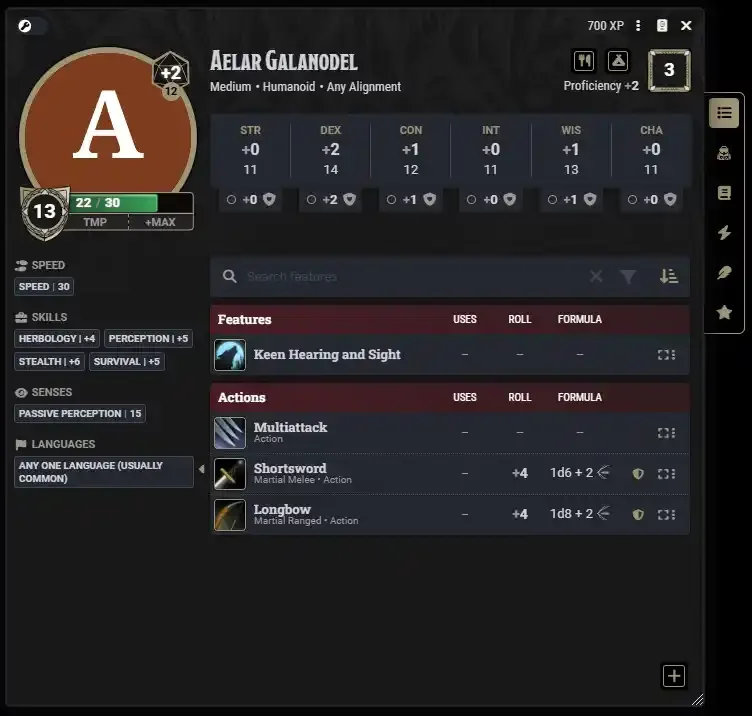
Aelar in dnd5e: note the "A" portrait synced from the vault, the page's title used as the document name, and the HP override (22/30) reflecting the foundry: block.
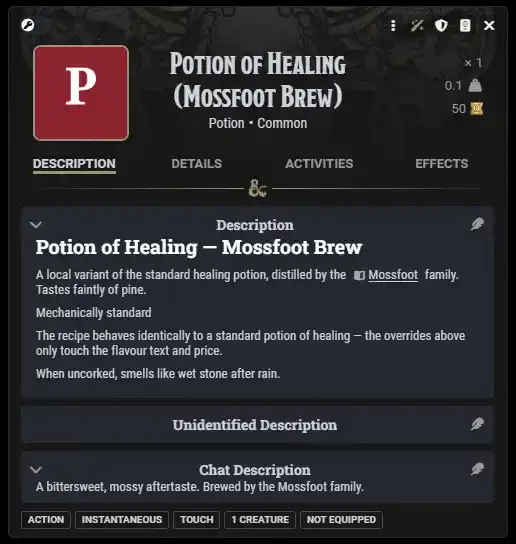
Healing Potion as a cloned dnd5e item: title from the page's
frontmatter, the article body embedded as the description, the
foundry.system.description.chat override visible in the chat
description block.
Starting from an exported JSON sheet
When you've got a hand-tuned Actor / Item / Scene from elsewhere (a
community share, an export from a previous campaign, a custom-built
sheet), point foundry.data_json at a JSON file in the vault and
the module deep-merges it onto the new document before foundry.data
applies. Lets you reuse the bulk of an existing sheet and still patch
specific fields per page:
---
title: Strahd von Zarovich
foundry:
  base: Actor:npc
  data_json: ./sheets/strahd-export.json   # vault-relative path
  data:
    system:
      attributes:
        hp: { value: 144, max: 200 }       # patches strahd-export.json
---
JSON files ship to the deploy as passthroughs (gated per role like any other file), and the build hashes the parsed content into the page's manifest entry — change the JSON, re-sync triggers an update.
Aelar is the live demo: he points at sheets/aelar-export.json for
biography, languages, skills, and pocket change, then layers the wound
penalty (HP 22/30), a CR bump, and the "(wounded)" token name from his
page's foundry.data block on top.
Pinning an explicit Foundry id with foundry.id
By default the module derives each page's JournalEntryPage id (and, if
foundry.base is set, the instantiated doc's id) from a SHA1 of
vaultId + path. That's stable but opaque, which is awkward when you
want to reference the page or doc from somewhere outside the vault: a
hotbar macro, a scene flag, another module's data, a hardcoded
@UUID[...] enricher.
Set foundry.id to a 16-char [A-Za-z0-9] string and the module pins
that id instead:
---
title: Mossfoot Great Hall
foundry:
  id: mossfootHall0001
  base: Scene
  data:
    name: Mossfoot Great Hall
---
The same id is used for the JournalEntryPage and the Scene, since
Foundry namespaces ids per collection (no collision risk).
Cross-page wikilinks [[Mossfoot Great Hall]] re-resolve through the
override automatically — they'll point at mossfootHall0001 rather
than the SHA1.
Mossfoot Great Hall is the live demo. Once the scene has been imported with "Keep Document IDs", a hotbar macro can run:
game.scenes.get("mossfootHall0001").view();
…and it works regardless of vault id, page rename, or repo redeploy. To reach the copy still sitting in the pack, name the pack instead:
(await fromUuid("Compendium.world.<vault-id>-scenes.Scene.mossfootHall0001"));
The parent JournalEntry id (folder-shared, since one entry covers
every page in a directory) is intentionally not overridable per page:
two siblings can't both claim it. If you change a page's foundry.id
between syncs, the previously-created doc with the old id is left behind in
the pack under the old id, and anything you had already imported keeps the
old id too. Neither is auto-deleted. Drop them by hand if you need to.
Moulinette: assets and scenes from the reader's own library
A vault can point at content it does not ship. Reference a map, a track, or a whole scene from Moulinette, and on sync it resolves against the reader's own Moulinette library — so the licensing question stays between them and the creator, exactly as it does when foundry.base names a compendium UUID. Nothing is redistributed, and a reader who is not subscribed simply gets less.
Requires the Moulinette module, installed and signed in.
The reference format
@moulinette/<pack_ref>/<filepath>
pack_ref is the number in a marketplace URL. Browse to a product at assets.moulinette.cloud and read it off the address bar:
https://assets.moulinette.cloud/marketplace/product/13648/the-mad-cartographer-sci-fi/outer-rim
                                                    ^^^^^
That pack is 13648. The two segments after it are the creator and product names run through a slugifier, purely for readability — they change when a creator renames a pack, so they are not part of the reference.
filepath is the asset's path inside that pack, which the Moulinette Browser shows for any asset. It keeps its slashes, because creators nest folders:
@moulinette/13648/images/maps/06-junkyard.webp
@moulinette/442/SFX/Basic/Environment/Waterfall (Loop).ogg
Assets: maps, images and audio
An asset reference goes wherever a path goes, in foundry.data or a data_json file, alongside @vault/:
foundry:
  base: Scene
  data:
    width: 4200
    height: 2800
    levels:
      - _id: defaultLevel0000
        background:
          src: "@moulinette/11938/images/maps/05BoarsTears/MAD_Taverns_05_FVTT_20x30_Boars_Tears_Taverna.webp"
    sounds:
      - name: Ambience
        path: "@moulinette/2333/Ambiences/Basic/City/School of Magic Refectory.ogg"
An unresolved reference takes its container with it, propagating exactly one level. A sound that loses its path is dropped from the array; a background that loses its src is deleted. But one missing track never discards the document — the scene still syncs, correctly sized and gridded, just without that piece. That is what makes a page degrade rather than point Foundry at a file that is not there.
Documents: whole scenes, actors and items
A @moulinette/ reference can also be a rung on foundry.base, where it names a document to clone rather than a file to point at — a creator's own scene, with their walls, lighting and ambience:
foundry:
  base:
    - "@moulinette/13648/json/scene/06-junkyard-empty.json"   # if the reader owns it
    - Scene                                                    # if not
  data:
    navName: Junkyard
foundry.base accepts a priority list, tried in order, so one page can serve readers with different content installed. A Moulinette rung names no document type of its own — only the reader's library knows whether an asset is a Scene or an Actor, and the CLI has to answer that question at build time with no library to ask — so a list containing one must also contain a rung that names the type. That entry is doing double duty: it tells the build what the page creates, and it is what a reader without the pack falls back to.
A page whose document already exists takes the update path, which applies foundry.data and data_json but never re-clones. To adopt a changed base, delete the document from the pack and Force Sync.
Versioning, and why the asset rung ages better
Creators re-export their catalogue for each new Foundry generation, and republish it as a new pack with a new pack_ref — often under the same name. So a pack_ref pins a Foundry version as much as it pins content.
A document is coupled to the generation it was exported for. A Foundry 13 scene imported into a Foundry 14 world keeps its walls, lights and sounds, but its map does not land where it belongs, because v14 moved a scene's background onto its Level. Foundry ships no conversion for this on the import path, so vaults does not attempt one. It reports it instead:
N document(s) came from a different Foundry generation and may not render correctly.
with the pack and both versions in the console. Point the base at a pack built for the reader's generation, or ask the creator for a re-export.
An asset has no such problem. A .webp is a .webp, and always will be.
That asymmetry makes composing a scene yourself the more durable pattern, and often the better one:
foundry:
  base: Scene
  data_json: Scenes/tavern.json     # your dimensions, grid, walls, lights, levels
with the map referenced from @moulinette/ inside that file. The licensing line falls where it should — you cannot redistribute a creator's art, but wall geometry and lighting are your work and ship freely in the vault. The vault carries the structure it owns; the reader's library supplies the licensed pixels. See Battlemaps for the same pattern applied to layered maps.
Many creators distribute through both Moulinette and their own Foundry module. If the reader has the module installed, a compendium UUID is the better rung: Foundry migrates compendium packs on load, which is exactly the step a raw Moulinette import skips.
base:
  - Compendium.mad-taverns.mad-taverns-maps.Scene.F3wyDaiec72h5sFG
  - "@moulinette/13648/json/scene/06-junkyard-empty.json"
  - Scene
Packs, and getting content into your world
A vault syncs into its own compendium packs, one per document type, grouped in a sidebar folder named after the vault:
Compendium Packs
└── Marlo Mystery
    ├── Marlo Mystery: Journals
    ├── Marlo Mystery: Actors
    └── Marlo Mystery: Scenes
To bring content across, right-click a pack and choose Import All, or drag individual documents out. Either way the documents become yours: a later sync updates the pack, and leaves what you imported alone.
Import All offers this, and it is worth taking. Vault documents have derived ids, so keeping them is what lets cross-references survive the trip: a scene's map note finds its article, and a re-import updates what you already brought over instead of adding a second copy.
A gated vault's packs are made GM-only. Foundry gates compendium visibility per pack, by user role, with no per-document filter, so any pack a player could open would show them every name and image in it. Per-page roles cannot be expressed at that granularity, so vault packs are shut to players and the roles take effect on import instead.
This is set on every sync, not left to Foundry. An unconfigured world pack is readable by players by default ({PLAYER: "OBSERVER"}), so a pack created before this behaviour existed is repaired the next time the vault syncs. Packs for a public vault are left browsable: nothing in one is withheld from anyone on the wiki, so there is nothing to protect.
Roles still work, in the world where Foundry can enforce them. Each document carries the ownership its page's role earned it, and Import All preserves that, so a role: public page lands player-visible and a role: dm page lands GM-only. Dragging a single document out is the exception: Foundry clears ownership on that path, and the document arrives GM-only whatever its role.
Everything Foundry, under foundry:
A vault says three things about Foundry, in settings.md, in the same vocabulary a page uses for its own foundry: block:
foundry:
  package: adventure      # none | compendium | adventure
  player_role: public     # highest role players may read; empty = none of it
  module:                 # optional; the manifest for `vaults build --module`
    id: my-module
    version: 1.0.0
Compile it with:
vaults build . --module              # writes downloads/module.json + the zip
vaults build . --module ./dist       # somewhere else, vault-relative
The directory has to be inside the vault, because the deploy is what serves the zip and the manifest's own download URL points at it. A module whose manifest names its own download URL (a GitHub release, say) is built in place beside that manifest instead, and the directory is ignored.
module is only needed if you compile a downloadable module. Anything Foundry accepts in a module.json goes in it, and only packs is written for you — title defaults to your vault_name and compatibility to v13+/v14. A module with its own scripts, styles or translations wants a real module.json at the vault root or in foundry/ instead, and the compiler prefers that file when both exist.
foundry.player_role: what your players can read
Set it in settings.md to the highest role your Foundry players are allowed to read. Pages at that role or below import as OBSERVER ownership (player-visible); everything above stays GM-only. Leave it empty, the default, and none of the vault is player-visible.
foundry:
  player_role: public
A vault with roles public, patron, dm running that setting:
| Page | Role | Foundry ownership |
|---|---|---|
| Aelar | public | default: OBSERVER (players can read) |
| Witchwood Cult | patron | GM-only |
| Hidden Caves | dm | GM-only |
Set it to patron instead and the middle row becomes player-visible too. The named tier is one players can read, not the first they cannot.
It was called dmRole, it named the first secret tier rather than the last readable one, and each GM set it themselves. Which pages are player-facing is a fact about the vault's content, so the vault says it — once, in settings.md, where the roles are already configured — and every reader who syncs it gets the same answer.
Hiding role-gated callouts inside player-visible pages
A page like Aelar is role: public, so it imports as player-visible,
but it contains [!dm] and [!patron] callouts that the GM authored for
themselves. Without protection, players viewing the journal would see those
callouts even though the wiki strips them at lower tiers.
The module solves this by wrapping each role-gated callout whose tier is
above foundry.player_role in a <section class="secret">
block during sync. Foundry's renderer hides secret sections from non-GMs
at view time, so:
- GM sees the full callout (with the standard "secret" visual marker and a "REVEAL" toggle to flip it to player-visible if they want).
- Players with Observer ownership see the journal but not the secret sections. The structurally-stored HTML hides them at render time, not with CSS.
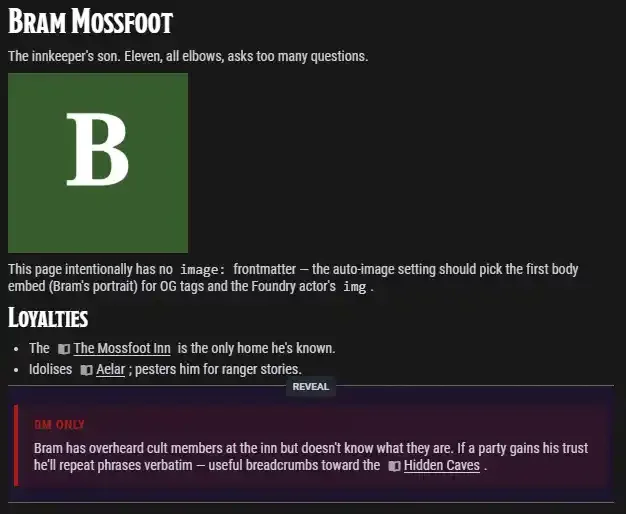
Bram's journal as the GM sees it. The [!dm] callout from the
markdown is wrapped in a Foundry secret block (the dimmed "DM ONLY"
section with the REVEAL divider), invisible to OBSERVER-tier players:
Same gate applies to Actor / Item descriptions that embed the journal page
via @Embed[…]: the embed expansion fans out through the page's HTML, so
secret sections inside it stay secret in the doc sheet too.
Force-sync after changing foundry.player_role to re-wrap previously-imported pages.
There is a known Foundry bug where secrets do not work on documents owned by a non-GM user. This isn't typically an issue with imported Journal Entries since they default to GM ownership (players get read access via the OBSERVER role), but it can cause problems if you change ownership or (more likey), a page is Embedded into an Actor/Item sheet that is owned by a non-GM. Be careful about this!
For pages that shouldn't leak their article into the actor sheet, DM-private notes, or stats-only pages where the embed adds nothing, set foundry.embed: false. The clone / blank doc still gets created with the right name, image, and foundry.data overlay. Only the description field is left at whatever the template (or blank) had.
Keeping a page out of Foundry with foundry.sync: false
By default every page in a synced variant becomes a JournalEntryPage. Some
pages have no business at the table: toolchain notes, build documentation,
drafts, anything that is about the vault rather than in the world.
---
title: Toolchain reference
foundry:
  sync: false
---
The page still renders on the wiki like any other. It simply never reaches
Foundry: no JournalEntry, no JournalEntryPage, no derived document even if
the page also declares a foundry.base. Wikilinks pointing at it from other
pages fall back to plain text rather than dangling @UUID[…] enrichers.
embed: false
foundry.embed: false only suppresses the article inside a derived
document's description. The journal page is still created. foundry.sync: false is the one that keeps the page out altogether.
Setting the flag on a page that already synced deletes its
JournalEntryPage from the pack on the next sync, treating it exactly like a
page removed from the vault. A copy you had already imported into the world is
yours and stays.
The alternative is ignore: in settings.md, which drops the page from the
build entirely so it reaches neither the wiki nor Foundry. Reach for ignore:
when the file is not content at all; reach for foundry.sync: false when it
belongs on the wiki but not in the world.